
Is Scarlet Skips hard for beginners?
The store calls it easy to pick up and hard to put down. Early deaths are usually timing, not a hidden RPG stat check. Stay on this beginner path, then controls.

This Scarlet Skips beginner guide is for the first twenty minutes after you click Play on Steam: how the one-button skip works, what a level-up choice is, and which goal to pick so you do not bounce between high-score clips and ending videos. Scarlet Skips launched September 3, 2026 from Yerk Games. Verified September 5, 2026 · Steam.
| Fact | Detail |
|---|---|
| Platform | PC (Steam) · Steam Deck Verified |
| Price | $4.99 USD |
| Input | One button — press, hold, release |
| Upgrade pool | 10 cards; 3 shown per level-up |
| Mode | Single-player only |
| Achievements | 1 Steam achievement |
| Reviews (snapshot) | Mostly Positive — 74% of 708 reviews (Steam snapshot) |
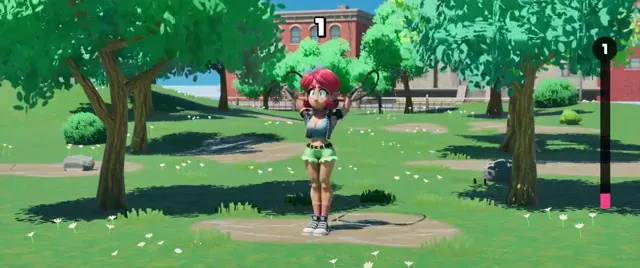
Scarlet Skips is not a map, a dungeon, or a party RPG. You load in, Scarlet starts skipping, and the entire session is “stay on the rope while power-ups rewrite the jump.” Official copy says you help her break out of a funk by touching grass — the playable version of that sentence is: keep jumping.
A typical first run has four beats. You find the timing. You last long enough for a level-up. You pick a card whose Steam-facing examples include jump height, an extra jump-rope, or fire. Then the next minute feels different enough that your old timing is wrong. That is the Rogue-Like half. The arcade half is that missing the rope ends the attempt.
Do not expect a tutorial dungeon. Steam’s own community already split the player base into “how to play,” “how to get a high score,” and “how to win (yes there is an ending).” Your first hour should pick one of those, not all three.

Early on, optimize consistency, not spectacle. Fire ropes and extra ropes look like the trailer. They also ask you to track more than one moving object. A first-run player who takes every flashy card will spend the session relearning the button instead of learning the beat.
There is no open-world checklist. Progress is: longer survival, weirder card stacks, a personal best, or a successful ending attempt. Meta-unlock trees are not listed on the store page — do not assume a huge account-level skill board exists until you see it in-game.
Level-up shows three random power-ups from about 10 upgrade cards. You pick one. The store says stacks combine into “virtually infinite” configurations — true as a combinatorics boast, not as a promise that every mix is good for a new player.
Official named effects you can plan around without datamining: increase jump height, add a jump-rope, set the rope on fire. Community clips also talk about mobility toys (rocket boots / air fuel). Treat extra names as TBA until you see the card text in your client.
| If the three cards look like… | New-player pick | Why |
|---|---|---|
| Height vs extra rope vs fire | Height | One object to track; teaches hold-time |
| Two extra-rope variants + fire | Skip fire if you still miss singles | Fire is a read, not a crutch |
| Unknown named cards | The one whose text you can finish reading | Unread cards are random grief |
| Anything that adds a second failure plane | Defer | Survive to the next choice |
Your second and third picks should answer a question: am I still dying to timing, or dying to clutter? Timing deaths → simpler cards. Clutter deaths → stop adding ropes until you can pass the original rhythm. Full stacking theory lives on builds.
Matched by build plan, shared topics, and guide progression — not random related links.
Most early failures are not “the game is broken.” They are a timing window you have not learned, a hold that no longer matches jump height, or a second rope you are not watching. Trailer animation is expressive on purpose — Scarlet’s body language is a readability feature and a distraction. Watch the rope first, the joke second.
If you die instantly on purpose, that may be the joke achievement path — see achievements. Do not confuse that with a broken jump bind.
Input lag on a TV, a high-refresh desktop, or Deck docked to a display will feel like the rope “cheated.” Test windowed on the PC monitor before you blame the card pool.
Steam community guides already split the player base. Strategy to Get a High Score is a different document from How to win the game (yes there is in fact an ending). Official store copy pushes both: “reach absurdly high scores” and “optimize for the perfect run” plus self-imposed limits.
For a first night, pick ending or score, not both. Ending attempts want a readable stack and a plan from ending. Score attempts want survival time and synergy from high-score and builds. Mixing them is how people tab out to two YouTube videos and learn neither.
The store explicitly invites challenge rules. That is not DLC. After you can survive a minute, try “no fire” or “no extra ropes” for a session. It is a better teacher than installing mods on day one.
Scarlet Skips is a $4.99 Steam Windows release with Steam Deck Verified. Copy live GPU rows from system requirements rather than from memory. Family Sharing is listed on Steam features. Language is English interface.
There is no official Discord we could verify. Use Steam discussions and the Steam Community hub for patch talk. This wiki is not a download mirror — buy the game on Steam.
A practical first evening looks like this. Boot Steam, confirm the jump bind, and play two throwaway runs where you only care about naming the death: early press, long hold, or late release. Do not open a high-score video yet. Do not open an ending spoiler yet. The Scarlet Skips store page already told you the verbs; you are just proving you can feel them.
On run three, take the first level-up. If height is offered, take it and immediately shorten your hold. If extra rope is offered and you still cannot survive twenty seconds, decline it even if it looks like the trailer. Fire is a readability tax: the animation system is the product, and it will steal your eyes from the rope.
On run four, decide the night’s goal. Credits hunters go to ending with a readable stack. Number hunters go to high-score only after a minute of survival exists. Achievement hunters pop achievements in a dedicated restart so they do not confuse a joke unlock with a broken bind.
If the PC feels unfair, rule out the display before the card pool. TV lag, overlays, and Deck docking all add frames. Copy specs from system requirements rather than from a friend who owns an RTX 2080. Then come back to this beginner loop. That is how a thin arcade game still earns a long wiki visit without fake RPG chapters.
The store calls it easy to pick up and hard to put down. Early deaths are usually timing, not a hidden RPG stat check. Stay on this beginner path, then controls.
Steam says 10 upgrade cards and a 3-choice level-up. Named examples are height, extra rope, and fire. Other names wait for in-client text.
Yes — community guides confirm an ending separate from high score. See ending.
Matched by build plan, shared topics, and guide progression — not random related links.